Deployed and indexing in days, inside your environment
Atolio deploys in your own cloud account or on-prem, under your IAM, keys, and SSO. A shared plan puts an owner on every step.
Inside your environment · cloud or on-prem
Atolio deploys in your own cloud account or on-prem, under your IAM, keys, and SSO. A shared plan puts an owner on every step.
Trusted by teams across leading enterprises


Most of the calendar goes to deploying, indexing, and testing.
Pick a topic to jump straight to it
1-2 weeks
to deploy and build the stack
~1-2 weeks
to connect and index, based on storage volume
~30 days
from pilot to full rollout
100%
self-hosted, in your environment
The whole product, backend and frontend, deploys into infrastructure you own.
Managed Kubernetes in your own AWS, Azure, or GCP account. Atolio's Terraform builds the cluster.
Any conformant Kubernetes cluster, including Red Hat OpenShift and IBM Fusion.
Images come from your internal registry, and answers come from a model on your own endpoint.
Your content, index, and logs stay in your account under either model.
Switch models to see who does what
Atolio-managed
A good fit when you want Atolio to carry the work
Customer-managed
A good fit when you run strict change control or an air gap
Runs the install
Atolio engineer
Your engineers, Atolio guiding
Access to your account
A support role you can revoke
Screenshare sessions you run
Applies upgrades
Atolio
Your team, Atolio guiding
Where data lives
Your account, under both models
Atolio connects to your identity provider, so every person and agent gets one identity across every system, with the access they already have.
Single sign-on (SSO) over OpenID Connect (OIDC), through the provider your team already manages.
Accounts, handles, and email aliases across your systems map to one identity.
Direct, group, and nested group memberships sync from your identity provider and are checked on every query.
Remove someone in your identity provider, and their access through Atolio goes with it.
Own your identity provider

Okta

Microsoft Entra ID

Google Workspace

Keycloak
Identity · Dana Reyes
Signed in with single sign-on

Slack
@dana
Mapped

Jira
dreyes
Mapped

Salesforce
dana.reyes@northbeam.com
Mapped

Google Drive
d.reyes@northbeam.com
Mapped
Groups from your identity provider
Support
EMEA
All staff (nested)
Timing depends most on how much data sits behind each connector.
Prep
Deploy
IdP setup
Connect and index
Pilot
Go live
Prep
Deploy
IdP setup
Connect and index
Pilot
Go live
Illustrative example reflects 3 sources and 1 pilot team
Go-live: teams live after week 6
Done
In progress
Next
Scheduled
1-2 days
01
Work through the deployment checklist.
Choose cloud account and model
Security review
1-2 weeks
02
Scripted infrastructure, SSO, and access controls in place.

Deploy infrastructure
Connect SSO
1 day
03
Connect your identity provider, so each person has one identity across sources.
About 1-2 weeks
04
Backfill content and permissions, then validate them. Timing depends on storage volume.
Connect and index sources
About 2 weeks per team
05
A small group tests on real work, starting with a validation session.
Name the pilot group
About 30 days
06
Foundation, Experimentation, and Mastery sessions, measured against your baseline.
Onboarding sessions
A shared mutual action plan carries you from the first demo to adoption.
Cloud engineer
Identity admin
Source admins
Security reviewer
Executive sponsor
Use-case owner
Account executive
Through procurement
Deployment engineer
For the build
Client success manager
Dedicated to your account
Work through the checklist at your own pace. Early approvals keep the timeline on track.
Deployment checklist
2 of 5 done
Choose your cloud and operating model
AWS, Azure, GCP, or on-prem · Atolio-managed or customer-managed
Set up sign-in
Connect your identity provider over OIDC, so each person has one identity across sources
Pick your first sources
At least one document store, one email platform, and one messaging tool are recommended to start
Get approvals early
IT, security, and app owners. Waiting on sign-off is the most common delay
Name a pilot group
People tied to the use case who will share honest feedback
Start with three or four sources. Add more any time after go-live.
Engineering


Sales
Support


Run the questions your people and agents already ask through your current setup and through Atolio. A performance report then shows Atolio's impact on cost, speed, answer quality, and the employee experience, so you can judge the return before you roll out.
<30
days
3-4
sources
5-10
pilot users
Pilot performance report
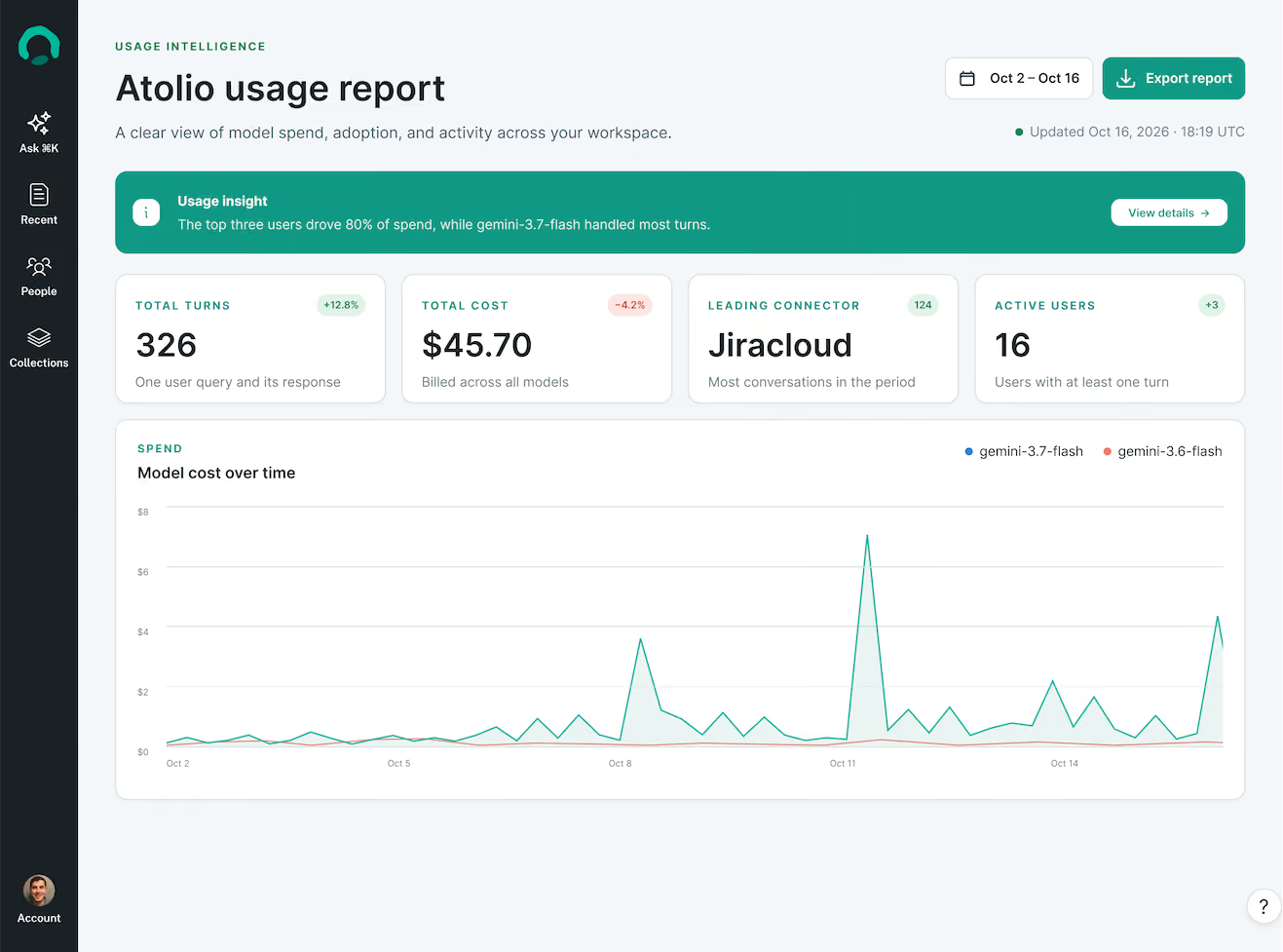
Success measures are agreed up front in your needs assessment, then measured on the same questions in both setups.
Cost
Up to 80% fewer tokens
Tokens and model spend per answer, broken down by user, model, and day.
Speed
Against your baseline
Response time on the same questions, with fewer and more refined tool calls.
Answer quality
Scored by your team
Accuracy and citations on real questions from your use case.
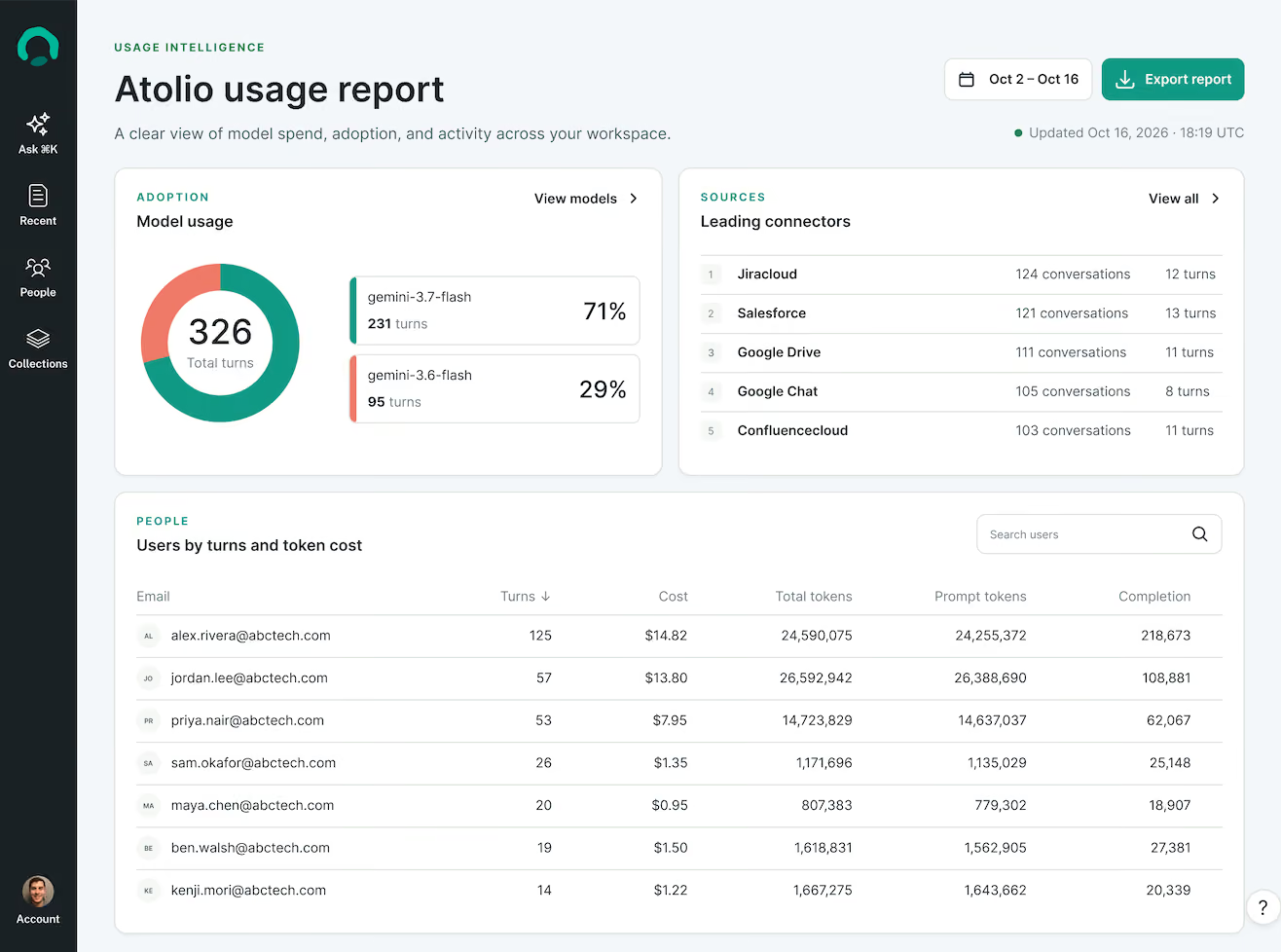
Adoption
By user and connector
Active users, turns, and the sources people draw on most.
Employee experience
From your pilot users
How Atolio fits into their daily work, in their own words.
Readout · same questions, two setups
Dedicated account
What changed in the renewal terms since last quarter?
Current setup
With Atolio
Answer quality
Baseline
Scored by your team
Tokens per answer
Baseline
Up to 80% fewer
Response time
Baseline
Fewer tool calls, faster answers
Permissions
Varies by tool
Checked on every answer
Citations
Varies by tool
Every answer
An executive sponsor and a use-case owner
Sources in a test tenant
A weekly 30-minute working session
A tested context layer in your environment
A performance report to judge ROI
Joint results to take to leadership
Direct input on our roadmap
Your content, index, and permissions stay in your account, from the first sync to the day you switch it off.
Own your environment
Content and permissions go into an index in your cluster, encrypted under your keys.
Permissions are checked on every request. Only scoped, cited context reaches your model. Every call lands in one audit trail, in your environment.
You set how much history to index. Logs and telemetry live in your storage.
Delete the cluster and storage with the same Terraform that built them.
What leaves your environment:
Scoped context, to the model endpoint you choose
Stays under the rules of where it was created and never leaves your environment uninvited.
Audit, recover, and reconfigure without waiting on Atolio.
Point Atolio at any model endpoint, and swap it any time.
The whole stack runs on compute you control.
Hardware needs vary by connector count and data volume. Atolio assesses your environment to size the cluster.
Once your teams are live, Atolio keeps supporting you. Your team keeps a few things current.
What Atolio provides
Atolio ships new releases and plans each upgrade with your team. A health check confirms every source is syncing afterward.
Your client success manager tracks releases, plans upgrades with you, and runs onboarding sessions as new teams join.
Add them without redeploying. Each new source backfills in about one to two weeks, depending on storage volume, then syncs in near real time.
Spend attributed in real time by user, agent, and system, plus adoption by connector, so you can keep tuning cost and coverage.
What your team keeps current
Partners


FAQs
Deploying Atolio typically takes a few weeks from kickoff to your first teams using it.
Deploying the stack takes one to two weeks: Atolio's Terraform and Helm scripts build the cluster in your cloud account or on your own Kubernetes, then single sign-on (SSO) through OpenID Connect (OIDC) and your security and access controls go in place.
Around the deployment, the calendar goes to three things. First, a day or two of prep, when your team works through the deployment checklist: cloud account, SSO, first sources, approvals, and a pilot group. Second, connecting and indexing, about one to two weeks depending on storage volume, while Atolio backfills each source's content and permissions. Third, about two weeks of user testing per team, starting with a testing-and-validation session. Go-live follows over about 30 days, with three onboarding sessions for your users.
The biggest variable is the data volume behind each connector. The most common delay is internal approval, so start your security review early. Every step sits in a shared mutual action plan with a named owner, so both teams always know what comes next.
Atolio-managed and customer-managed deployments differ in who runs the install. Your data lives in your account either way.
In both models, Atolio runs in your own cloud account or on-prem Kubernetes cluster, under your identity and access management (IAM) policies and encryption keys.
In the Atolio-managed model, your cloud engineer creates a delegated support role. An Atolio engineer uses it to deploy the infrastructure, then monitors and updates the platform over time. You can revoke that role whenever you like, or keep it in place for ongoing support.
In the customer-managed model, your engineers deploy with Atolio's Terraform and scripts, and an Atolio engineer guides the session over screenshare. This suits teams with strict change control or an air-gapped network, and an Atolio engineer can join each upgrade to guide it.
In both models your content, index, and logs stay in your account, and your security team keeps full visibility into the environment, including raw logs and telemetry for audit.
Atolio uses at least one GPU in production, to create the embeddings behind its index.
A GPU with 16 GB or more of memory, such as an NVIDIA T4 or L4, covers the embedding service. Everything else, including the search index, permission checks, and the Model Context Protocol (MCP) server, runs on standard CPU nodes in your Kubernetes cluster.
For a proof of technology or a staging environment, Atolio can run on CPU only, which keeps the trial footprint small.
Large language model (LLM) inference runs separately from the Atolio cluster. You point Atolio at the model endpoint you choose: a managed provider such as Azure OpenAI, AWS Bedrock, or Google Vertex, any OpenAI-compatible endpoint, or a model you host yourself. If you host your own model, size those GPUs for the model you pick.
Before deployment, Atolio can run a content scan to size the cluster to your data. Full hardware requirements for each cloud are on docs.atolio.com.
Yes, you can start Atolio with a few sources, and most deployments begin with three or four.
Atolio finishes an initial sync of each source before your users get full results, so a lean start gets people working with it sooner.
At minimum, connect one document repository, one email platform, and one messaging tool. Common starting sets by team: Engineering uses Google Drive, Gmail, Slack, and GitHub. Sales uses Google Drive, Gmail, Slack, and Salesforce. Support uses SharePoint, Outlook, Teams, and Jira. Pick the sources that match the use case from your needs assessment and the pilot group who will test it.
You can add sources and teams at any time after go-live without redeploying. Each new connector backfills content and permissions in about one to two weeks, depending on storage volume, then keeps permissions in sync in near real time. You also choose how much history each connector brings in, and you can scope each team's access to every source, down to the path.
Atolio needs access to your cloud account or cluster, your identity provider, and the sources you connect.
For infrastructure, the Atolio-managed model uses a delegated support role that your cloud engineer creates and can revoke. In the customer-managed model, your engineers run the install themselves with an Atolio engineer guiding them.
For sign-in, Atolio connects to your identity provider over OpenID Connect (OIDC): Okta, Microsoft Entra ID, Google, or Keycloak. That handles authentication and maps each person to one identity across every connected system.
For each source, a source admin creates credentials, such as an OAuth app or a dedicated integration user with read access to the content you want indexed. Atolio reads content along with its permissions, so every answer matches what the person asking is allowed to see.
You decide which systems and how much history to connect. All of it runs inside your environment under your keys, and your team can review or rotate every credential at any time.
No, your permissions don't need to be cleaned up before you deploy Atolio.
Atolio reads each source's permissions as they are today and enforces them on every query, for people, service accounts, and agents. Each person gets answers based on exactly what they have access to read at the moment they ask the question.
Most organizations have some access that's broader than intended, such as a finance folder shared with the whole company. You don't have to find all of it first. Knowledge scopes keep restricted data out unless it's approved, and you can limit each connector to the paths and history you choose, so sensitive areas can wait until they've been reviewed.
When your team tightens access in a source system, Atolio picks up the change in near real time. That lets cleanup run alongside the pilot and rollout instead of holding them up.
Before pilot users start, Atolio's deployment engineer runs a testing and validation session with your team to confirm the index is healthy and permissions came through as expected. Single sign-on (SSO) through your identity provider maps each person to one identity across every connected system.
No, your data doesn't need to be organized before you start with Atolio.
Atolio works with your systems as they are. It indexes content and permissions from each source into one index in your environment, then ranks results across all of them in a single pass. The right document surfaces even when it sits in an unexpected place or has a vague name.
Scattered, duplicated, and out-of-date content is normal in every enterprise. You choose how much history each connector brings in, so older material can stay out, and every answer cites its sources, so users can check where it came from.
Most deployments start with three or four sources tied to one use case from your needs assessment. That keeps the first phase focused on the data your pilot group relies on. Usage reporting then shows which connectors people actually draw on, which helps you decide where to add sources next and where cleanup will pay off.
Your source systems stay the source of truth. Anything your team reorganizes, renames, or deletes there syncs to Atolio in near real time, so your data can improve over time without redoing the deployment.
An Atolio proof of technology shows the product working in your stack, on your questions, in under 30 days.
We run it as a hypothesis test: take the questions your people or agents already ask, run them through your current setup and through Atolio, and compare answer quality, speed, and cost.
Atolio runs in a dedicated account in your cloud, with single sign-on (SSO) through your identity provider, so it stays separate from production. The scope is deliberately small: three or four sources in a test tenant and five to ten pilot users. CPU-only infrastructure works at this stage.
From your side, we ask for an executive sponsor, a use-case owner, and a weekly 30-minute working session. In return you get a tested context layer in your environment, a performance report on cost, speed, answer quality, adoption, and user feedback, joint results to take to leadership, and direct input on our roadmap. Success measures are agreed up front during the needs assessment, so the readout answers the question your team set out to test.
Atolio ships upgrades as new releases, and who applies them depends on your operating model.
In the Atolio-managed model, Atolio's engineers apply each release through the support role you control and monitor the platform afterward. In the customer-managed model, your team applies releases with Atolio's Helm charts and scripts, and an Atolio engineer can join the session to guide it. Either way, upgrades are planned with your team so they fit your change windows.
After an install or upgrade, Atolio's health check confirms that every source is syncing and that permissions are current, so both teams can see the result. Air-gapped deployments receive releases through your internal registry mirror, so nothing needs to reach outside your network.
Your team keeps the parts it owns up to date: secrets, service accounts, and certificates, plus user and group membership in your identity provider. Your dedicated client success manager (CSM) tracks releases and plans upgrades with you.
If you stop using Atolio, your data stays where it has always been: in your own environment.
Atolio runs entirely inside your cloud account or data center, so the index, permission data, logs, and configuration all live in storage you own. None of your indexed content or query data ever reaches Atolio.
To offboard, your team deletes the Atolio cluster, its storage volumes, and its object storage buckets, using the same Terraform that created them. If you used the Atolio-managed model, revoke the support role. Then remove the connector credentials and the OpenID Connect (OIDC) app in your identity provider.
Your source systems remain the source of truth throughout, so nothing needs to be migrated back. Your encryption keys stay under your control, which means destroying or rotating them makes any leftover copies unreadable.
Atolio's standard data processing agreement (DPA) is part of our master agreement and covers how this works contractually.